


There is a straightforward case for trying MegaBlock in demo mode before putting real money on the table, and it has nothing to do with caution for its own sake. MegaBlock is a genuinely different kind of game. The block-stacking mechanic, the timing element, and the four difficulty modes all interact in ways that take a few rounds to properly feel out — and those first few rounds are much better spent with virtual chips than with real ones.
InOut Games makes the demo available directly on their official website with no account, no registration, and no deposit required. Everything in the demo is identical to the real-money version — all four difficulty modes are active, the full multiplier range is intact up to x2,941,884 on Hardcore, and the cashout mechanic works exactly as it does when real stakes are involved. The only difference is that the balance is virtual and winnings cannot be withdrawn. For a game where the core skill is understanding your own timing and knowing which difficulty level suits your bankroll, that is a genuinely useful environment to spend time in.
What the MegaBlock demo does particularly well is give you access to the difficulty system at zero cost. Most players who jump straight into real money play pick a mode based on the multiplier numbers alone — Hardcore looks attractive on paper until you realise how quickly fifteen blocks can disappear. The demo lets you work through that lesson without it costing anything, which is a better outcome for everyone involved.
How to Play the MegaBlock Demo – Step by Step
Getting into the MegaBlock slot demo takes under a minute and requires nothing from you beyond a browser and an internet connection. The steps below cover the full process from finding the game to completing your first real round, including a few details that are easy to miss on the first attempt.
- Find a demo source — The most direct route is the official InOut Games website, where the MegaBlock demo loads without any account or registration. Many casino review sites also embed the demo directly on their game pages, which works just as well if you prefer not to navigate to the developer’s site.
- Launch the demo — On the game page, look for a Demo or Free Play button rather than a Play for Real option. Click or tap it and the game will load in your browser within a few seconds. No download, no install, no form to fill in.
- Select your difficulty mode — Before placing a bet, use the difficulty selector in the bottom panel to choose between Easy, Medium, Hard, and Hardcore. If this is your first time playing, start with Easy. The timing mechanic will feel the same across all modes but the consequences of a miss are much less disorienting when the multiplier ceiling is lower.
- Set your bet size — Use the bet controls to choose how much of your virtual balance to wager per round. In the demo this has no real consequence, but it is worth practicing with amounts that reflect what you would realistically bet in real money play — it keeps the demo experience honest.
- Press Go and watch the block drop — Hit the Go button and the block suspended above your tower will fall. If it lands cleanly the multiplier increases and the next block appears. If it misses the round ends. The timing of the drop is fixed — what varies is the angle and position of each swing, which is determined by the RNG.
- Hit Cashout when you are ready — At any point after a successful placement you can press Cashout to lock in your current multiplier and collect your virtual winnings. Practicing your cashout discipline in the demo is one of the most useful things you can do — the temptation to hold on for one more floor is just as real with virtual chips as it is with real ones.
- Switch difficulty modes between rounds — The demo is the ideal place to work through all four modes back to back. Play ten rounds on Easy, then ten on Medium, then move up from there. The difference in pace, pressure, and multiplier behaviour between modes is significant and something you need to experience firsthand rather than read about.
- Use autoplay to observe patterns — Before finishing your demo session, try running autoplay for twenty or thirty rounds on a fixed difficulty and bet size. Watch how often rounds end early, how high the multiplier typically climbs before a miss, and how the balance moves over time. That information will directly inform how you approach the real money version.
The demo has no time limit and no round cap — you can stay in it as long as you find it useful. Most players find that thirty to fifty rounds gives them a solid feel for the game, though switching between difficulty modes in that time is more valuable than grinding a single mode repeatedly.
MegaBlock Demo – Pros and Cons at a Glance
The demo version of MegaBlock is a genuinely useful tool, but like any free play environment it has limits worth understanding before you rely on it too heavily. The table below puts both sides in one place so you can make an informed decision about how much time to spend there and what to take away from it.
| Aspect | Pro | Con |
|---|---|---|
| Cost | Completely free, no deposit needed | No real winnings possible |
| Registration | No account required in most cases | Some casinos require login to access demo |
| Game content | All four difficulty modes available | No real financial pressure to sharpen decisions |
| Multiplier range | Full range up to x2,941,884 accessible | Big multipliers feel different without real stakes |
| Timing mechanic | Identical to real money version | False confidence can develop from low-pressure play |
| Bankroll practice | Unlimited virtual resets available | Unlimited resets remove natural session discipline |
| Difficulty switching | Free to switch modes between every round | No cost to experimenting means less commitment |
| Provably fair | Same RNG as real money version | Cannot verify outcomes without a real round hash |
| Autoplay | Fully functional in demo | Running long autoplay sessions can distort expectations |
| Availability | Accessible on desktop and mobile browsers | Not all casinos offer demo without registration |
| Time limit | No round cap or session limit | Unlimited time can delay the transition to real play |
| Learning value | Best environment for learning timing and modes | Cannot fully replicate the psychology of real money risk |
The pattern across the table is consistent with most demo implementations — the mechanics are perfectly replicated but the emotional context cannot be. MegaBlock in particular is a game where the decision to cash out is heavily influenced by how much the current multiplier actually means to you, and virtual chips simply do not carry that weight. Use the demo to learn the game, then make the transition to real play at a stake level where the decisions feel real without the amounts being uncomfortable.
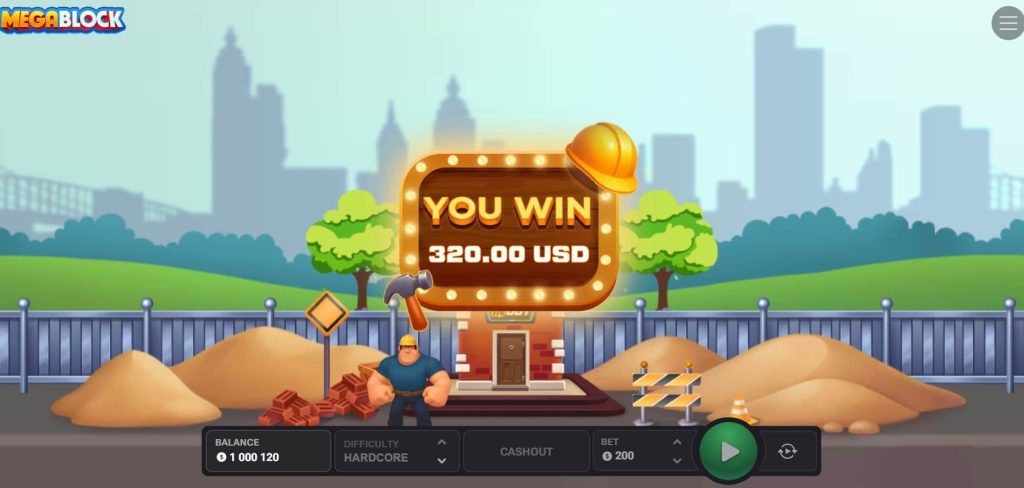
Where to Play the MegaBlock Demo
The MegaBlock crash demo is accessible in a few different places, and the experience varies slightly depending on which source you use. Knowing where to look saves time and ensures you are playing the actual game rather than an outdated or incorrectly configured version.
The most reliable options are the following:
- InOut Games official website — The developer’s own site is the cleanest and most reliable source for the MegaBlock demo. The version here is guaranteed to be current, requires no registration, and loads directly in the browser without any casino interface around it. For a pure, distraction-free first look at the game this is the best starting point. Navigate to the Games section, find MegaBlock, and the demo button is on the game page.
- Licensed online casinos — Most casinos that carry InOut Games titles make the MegaBlock demo available alongside the real money version. Playing the demo here has a specific advantage: you experience the game in the exact environment where you would eventually play for real — same lobby, same interface, same loading behaviour. Platforms like Stake, 1win, and Mystake are confirmed to carry MegaBlock and offer demo access through their game pages.
- Casino review and affiliate sites — A number of iGaming review sites embed the MegaBlock demo online directly on their game review pages via InOut Games’ API. This is convenient for players who want to try the game while reading about it, though the embedded version can occasionally run slightly slower than the direct source depending on the host site’s performance. It is a perfectly functional option for a quick session.
- Mobile browser — Regardless of which source you use, the MegaBlock demo runs in any modern mobile browser without a separate app or download. Safari on iOS and Chrome on Android both handle it without issues. If you intend to play the real money version on mobile, testing the demo on the same device and browser you plan to use for real play is worth doing — it confirms the performance and controls feel right before any money is involved.
One thing worth noting across all sources: the demo balance and session progress do not carry over between visits or between different platforms. Each new demo session starts fresh, which is fine for learning purposes but means any autoplay data or pattern observations you collect are session-specific.
Is the MegaBlock Demo Worth Your Time?
The short answer is yes, and the longer answer depends on how seriously you intend to take the game. For casual players who want a quick look before deciding whether MegaBlock is their kind of thing, the demo delivers exactly what it promises — a full, unrestricted run at the game with no commitment required. Five minutes in Easy mode is enough to know whether the block-stacking mechanic clicks for you, and if it does not, you have lost nothing in finding that out.
For players who plan to approach MegaBlock more seriously — particularly those considering Hard or Hardcore difficulty where the multiplier swings are significant and rounds can end in a handful of placements — the demo is less optional and more essential. The gap between knowing how the difficulty modes work in theory and knowing how they feel in practice is wide enough that skipping the demo on those higher modes is a genuine disadvantage. Hardcore in particular has a pace and a pressure that reads very differently on screen than it does in a written description, and the demo is the only honest way to prepare for it without spending money in the process.
What InOut Games gets right with the MegaBlock demo is that they have not held anything back. Every mechanic, every difficulty mode, and the full multiplier ceiling are all present and functional. That level of transparency is not universal in this category and it reflects well on the developer. It also means that when you do make the move to real money play, you are making it with accurate information — not a simplified preview that leaves out the parts that actually matter.
FAQ
Do I need to register anywhere to play the MegaBlock demo?
No registration is required to access the demo on the official InOut Games website. The game loads directly in your browser and starts immediately with a virtual balance. Some online casinos may require a login before the demo becomes available in their lobby, but this varies by platform — if you want guaranteed no-registration access, the developer’s own site at inout.games is the most reliable option.
Is the MegaBlock demo exactly the same as the real money version?
Mechanically yes. The block physics, the RNG, all four difficulty modes, the full multiplier range, the cashout mechanic, and the autoplay function all work identically to the real money version. The only difference is that the balance is virtual and cannot be withdrawn. InOut Games does not offer a reduced or simplified demo — what you play in free mode is the complete game.
Can I play the MegaBlock demo on my phone?
Yes, fully. The demo runs in any modern mobile browser on both Android and iOS without requiring a download or app installation. The interface is touch-optimised and all features including difficulty switching and autoplay are available on mobile. If you plan to play the real money version on your phone, testing the demo on the same device first is a sensible step.
How long can I play the MegaBlock demo for?
There is no time limit and no round cap on the demo. You can play for as long as you find it useful. If your virtual balance runs out at any point, refreshing the page resets it to the starting amount. The only practical limit is your own patience — though thirty to fifty rounds across different difficulty modes is generally enough to build a solid understanding of how the game behaves.
Does playing the demo help with real money play?
It helps with the mechanical side — learning the timing, understanding how each difficulty mode behaves, and getting comfortable with the cashout decision in a low-pressure environment. What the demo cannot fully replicate is the psychological element of real money play, where the decision to hold or cash out carries actual financial weight. The demo is a useful foundation but not a complete substitute for the real experience, particularly on Hard and Hardcore where the stakes of each placement are significantly higher.